
Flag Maker GIF: How to Make an Animated Waving Flag
Flag maker GIF steps: turn a flat flag design into a looping waving animation, pick frame count and loop length, and see where transparent GIFs fail.
By the Flag Maker team
A flag maker GIF is an animated waving flag built from one flat design: export your flag as a PNG, bend it across a short run of frames, then save those frames as a looping GIF. The design happens in the flag editor, the waving happens in a GIF or video tool afterwards, because flag makers export still images.
So if you want to make your own waving flag and post it, the job is two steps, not one. Nothing here needs paid software, and the editor itself is free to use.
Why an animated waving flag sells a design
A flat rectangle looks like artwork. A waving one looks like cloth on a pole, and people judge flags as cloth.
Motion also tests the design. When the fabric folds, thin lines break and small text turns to noise. Detail near the fly end travels furthest, so that is where a weak design shows first.
That makes the GIF a useful check before you order anything printed, not just something to share.
Making a waving GIF from a flat flag image
- Export the still design first. Use the ratio you plan to fly and a width that suits the end use, often 480 to 800 pixels for social or a web page. The PNG and SVG export guide covers sizes, and flag proportions covers the shape.
- Open the PNG in anything that can warp a layer: an image editor with a wave or displacement filter, a video editor with a mesh warp, or a GIF builder that has a flag effect built in.
- Build the wave as a horizontal ripple running from hoist to fly, plus a slight vertical tilt. Keep the hoist edge nearly still, since that edge is tied to the pole.
- Add shading. A warped flat image still looks like paper. Light on the crests and soft shadow in the troughs is what reads as fabric.
- Make the last frame flow into the first. Move the ripple exactly one full wave across the whole run of frames and the loop closes with no visible jump.
- Export as GIF with the loop count set to repeat forever, which is a loop value of 0 in the file itself.
If you started from one of the printable flag blanks or drew the flag from scratch, keep the layered original. You will want it again when the animation exposes a problem.
Frame count, loop length and file size
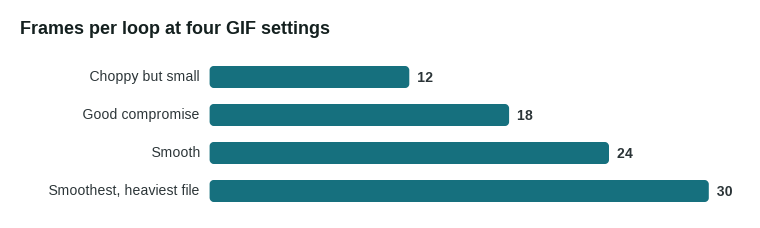
GIF stores each frame delay in hundredths of a second, so frame rates come in steps rather than exact numbers. A delay of 4 is 40 milliseconds, roughly 25 frames per second. Delays of 1 or 2 are handled inconsistently across browsers, so stay at 3 or higher.
| Frames | Delay | Loop length | Result |
|---|---|---|---|
| 12 | 8 | 0.96 s | Choppy but small |
| 18 | 6 | 1.08 s | Good compromise |
| 24 | 4 | 0.96 s | Smooth |
| 30 | 3 | 0.90 s | Smoothest, heaviest file |
File size comes down to three things: pixel dimensions, frame count, and how many colors each frame holds. GIF allows 256 colors per frame, which suits flat flag colors nicely, so a two color flag compresses far smaller than a flag carrying a photo or a gradient. When a file is too heavy, cut the dimensions first, then the frame count.
Transparent background GIFs and where they break
GIF transparency is one bit per pixel. A pixel is either fully transparent or fully solid, with nothing between.
That is the whole problem. Antialiased edges, soft shadows and glows all depend on partial transparency, so they get snapped solid or thrown away. What you see is a stair stepped outline, or a pale halo in the color of whatever background the file was flattened against.
Three ways around it:
- Flatten against the exact background color the GIF will sit on, so the fringe blends in.
- Keep the flag edges hard, with no shadow and no glow, and live with slightly stepped curves.
- Use a format with a real alpha channel: APNG, animated WebP, or WebM with VP9 alpha.
A photo or a detailed logo inside the flag makes the halo worse, because those bring soft edges of their own. The guide on adding a logo or photo explains why hard shapes hold up better.
GIF vs MP4 and WebM for flag mockups
| Format | Transparency | File size | Plays in |
|---|---|---|---|
| GIF | On or off only | Largest | Almost everything, including email and chat |
| MP4 (H.264) | None | Smallest | Any video player, autoplay needs muted |
| WebM (VP9 alpha) | Full alpha | Small | Current browsers, not email |
| APNG | Full alpha | Medium | Current browsers |
Pick GIF when the file has to paste anywhere without thought. Pick WebM or APNG when you need a genuinely transparent background over a colored page. Pick MP4 when the clip runs long and size matters most.
Where to use the animation once you have it
Social posts, a Discord or Slack custom emoji, a site header, a project README, a club or band page, the opening of a video. Every platform sets its own upload ceiling and its own pixel limits for emoji, so check those before exporting at full size.
One limit is worth stating plainly: an animated file is useless for print. A flag shop wants a still, high resolution file at the finished size. Treat the GIF as a preview and a sales tool, not the deliverable.
Start with the flag, then animate it
Design the flag first in Flag Maker Online on the home page, set your colors and shapes, then export the still image and take it into a GIF tool. Making your own flag walks through the editor step by step if you are starting from a blank field.
Frequently asked questions
Can I make a waving flag GIF for free?
Yes. The design side costs nothing here, and the animation step has free options too: an image editor with a wave or displacement filter, an open source video editor, or a browser based GIF builder. None of that needs a subscription. What it does need is time, since getting the loop to close cleanly and the shading to look like cloth takes a few tries.
Why does my transparent flag GIF have jagged white edges?
Because GIF transparency is one bit per pixel. Every pixel is either fully see through or fully solid, so the soft antialiased pixels along a curve or a letter get forced one way or the other. A pale fringe is the white background the file was flattened against. Flatten against the color the GIF will sit on, or switch to APNG or WebM with a real alpha channel.
How long should a waving flag loop be?
About one second, covering a single full wave cycle. In practice that means 18 to 24 frames at a delay of 4 to 6 hundredths of a second. Short loops keep the file light and the motion still reads as continuous. Longer loops add file size without looking better, unless the flag is doing something more than waving.
Can a print shop use my animated flag GIF?
No. Printing needs one still image at the finished flag size, either a vector file or a high resolution PNG, commonly 100 to 150 pixels per inch of printed flag depending on what the shop asks for. A GIF is small, capped at 256 colors per frame and animated, so a press has nothing to work with. Send the still export instead.